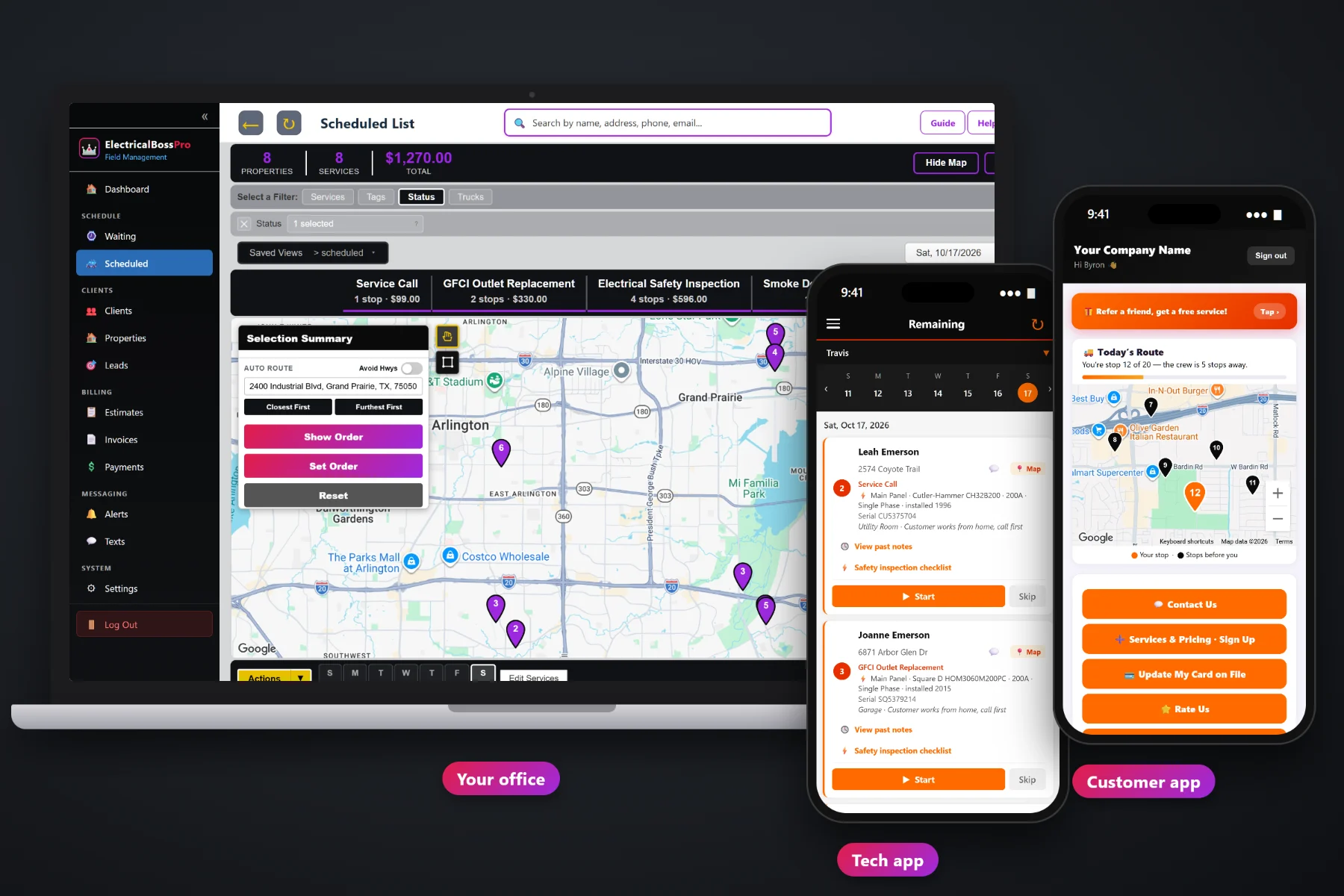
An electrical company runs on details that usually live in too many places: the panel brand written on a work order, the generator serial number in somebody's phone, the inspection notes on a clipboard, the invoice in a spreadsheet. ElectricalBossPro keeps the equipment on the house, puts the day's calls in route order on the tech's phone with a safety inspection checklist built in, brings recurring visits due on a live map, and bills the job when the tech taps Complete.
Plans start at $59/month and every plan includes the office, the tech app and the customer app. Equipment records, inspections, recurring plans, dispatch, estimates and billing are part of the platform, not extras you add later. Start with the overview at ElectricalBossPro, then use this page to see how the whole system fits an electrical shop.
Main panel, subpanels, meter base, generator, transfer switch, EV charger, surge protector and more, each with brand, model, serial, year and rating.
Panel, breakers, AFCI, GFCI, grounding, detectors, readings and a condition, filled in on the tech's phone and printed as a report.
Yearly inspections, generator maintenance and relamping visits come due on their own and show as colored pins.
Jobs by day and van, auto-routed Closest First or Furthest First from the shop, with printable route sheets.
Build estimates from your service list, let the customer approve online, and the approved estimate becomes the scheduled job.
Invoice and card-on-file charge at completion, online payment, past-due follow-up and one monthly statement for multi-address accounts.
Every property in ElectricalBossPro keeps a list of its electrical equipment. When a new job is booked at that house, the From House picker fills it in. When the tech updates something on the job, the change flows back to the house, so the next call starts with what the last one learned.
Electricians did not get into the trade to fill out software. ElectricalBossPro asks for the information you already keep somewhere, puts it in one place, and gives it back on the phone, on the map and on the invoice. Techs use the iPhones and Android phones they already carry, with no app store download.
Bring in your list with CSV import. Addresses are placed on the map automatically, and one client can hold many addresses.
Enter the services you sell, from a service call to a panel upgrade, plus yearly inspection and generator maintenance plans.
Give each employee a personal PIN and a van, so the dispatch board and the phones line up from day one.
Schedule calls, route the vans, and let techs work the list, fill the checklist and tap Complete to bill.
Most field-service tools give a job an address and a notes box. An electrical job is a panel with a rating and an age, a generator with a fuel type and a serial number, a checklist of readings, and a homeowner who wants to know what was found.
Ask an electrical contractor how the paperwork really works and you hear the same story: a carbon-copy work order that never made it back to the office, a generator serial number on a photo nobody can find, and a return call to a house where nobody wrote down what panel was in the garage. Which detectors were replaced. Whether the yearly maintenance plan was paid. Whether anyone told the homeowner the van was coming today.
That information belongs on the house, not on a clipboard or in one tech's memory. When it lives on the property, any tech can take any call and the office stops digging through old invoices to answer a question.
ElectricalBossPro keeps the customer, the house, the equipment, the job and the invoice together, from the first estimate to the paid bill and the next yearly visit.
Every tool here exists to get service calls, installs, inspections and generator visits done with fewer phone calls, fewer return trips and fewer unpaid invoices.
Panels, generators, transfer switches, EV chargers, surge protectors, solar and batteries with brand, model, serial, year and rating.
New jobs fill in from the house record, and changes made on a job flow back to the house.
Panel, breakers, AFCI, GFCI, grounding and bonding, surge, detectors, meter base, generator and EV charger, all on the phone.
Voltages, main breaker amps, measured load, ground resistance, panel age, IR hot spot, a condition and written recommendations.
Print an Electrical Safety Inspection report for the homeowner straight from the job.
Every visit that has come due on a live map, colored not due yet, due now or overdue.
Yearly inspections and generator maintenance at 365 days, relamping every 14 or 30 days, or whatever you set.
Jobs by day and van, auto-route from the shop, set route order, saved views and printed route sheets.
Company login and PIN, calls in route order, navigation, Start / Skip / Complete, photos, time clock and crew GPS.
Live route map, service requests, sign-ups, card updates, invoices and payment, ratings and referrals.
Built from your service list, approved online, converted into the scheduled job, with follow-up emails and templates.
Square feet, fixtures and circuits on each property, so services can be priced off them.
Line items, sales tax, card on file, auto-charge on completion or on a schedule, and past-due follow-up.
One statement each month for a property manager, gym or retail chain, every line labeled with its address.
Text customers from the office, plus automatic reminders and alerts by text and email.
Start $59, Pro $89 and Crew $199 per month, with a 14-day free trial and no credit card.
Service calls come in by phone, text and the website form. Yearly safety inspections and generator maintenance come due on their own and land on the Waiting List map. The office puts each job on a van and a day, auto-routes Closest First or Furthest First from the shop, and the phones show the same order. As techs tap Complete, the office sees the checklist, photos and invoice. For the full picture, read Electrical Contractor Software: The Complete Guide for Residential Electrical Companies.
Most electrical work needs someone home to open the door and clear the way to the panel. Automatic reminders the night before, alerts when they are next and when the tech arrives, and a live map in the customer app tell the homeowner when to expect the van. Afterward they see the invoice, pay online, update their card, sign up for a yearly generator maintenance plan or request the next job.
Pick the plan that fits your shop. Every plan starts with a 14-day free trial and no credit card.
Compare plans on the pricing page.
Residential service calls and repairs, panel upgrades, EV charger installs, whole-house generators and their yearly maintenance, lighting work, and property managers, landlords, gyms and retail chains with many locations. One-time calls, installs and recurring plans all run in the same system.
Main panel, subpanels, meter base, service entrance, whole-house generator, transfer switch, generator interlock, EV charger, whole-house surge protector, solar inverter, battery storage, pool/spa panel and exterior disconnect. Each can hold brand, model number, serial number, year installed, rating in amps or kW, phase or fuel type, location and access notes.
No app store download. The tech app runs in the browser on iPhone and Android and can be installed to the home screen. Techs sign in with your company login and their own personal PIN.
Yes. Use CSV import to bring in clients and addresses. Imported addresses are placed on the map automatically, so the Waiting List and dispatch board work from the first day.
Yes. Set the client to Monthly and they get one statement each month that covers every address, with each line labeled by its address.
Start is $59/month, Pro is $89/month, and Crew is $199/month. Every plan starts with a 14-day free trial with no credit card. Plans include a monthly text allowance of 500, 1,000 or 2,000 segments sent and received.
This page covers the platform as a whole for electrical contractors. For the homepage tour of features, plans and the live demo, see the full ElectricalBossPro platform overview.
Practical reading on choosing software, moving off paper, equipment on the house, the safety inspection checklist, the Waiting List, dispatch, the tech and customer apps, estimates, billing, monthly accounts, texting, setup and CSV import.
Equipment on every house, a safety inspection checklist on every phone, recurring visits due on the map and invoices at completion. Try ElectricalBossPro free for 14 days.