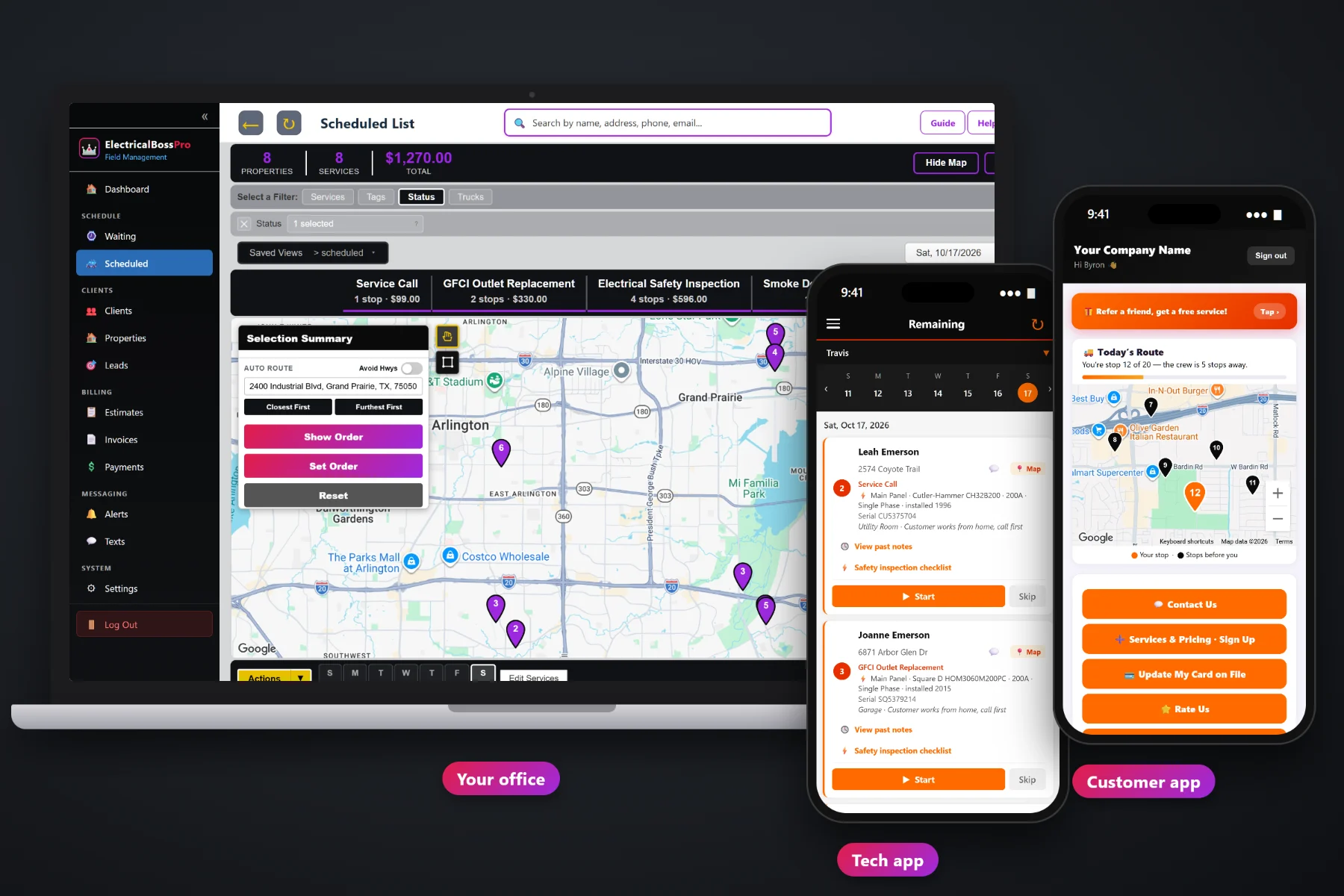
An electrical company's week is a mix that never sits still: a dead outlet this morning, a tripping breaker after lunch, a panel upgrade that needs the whole day, an EV charger install on Thursday and a list of generators due for their yearly service. ElectricalBossPro puts all of it on one dispatch board by day and by van, auto-routes each van Closest First or Furthest First from the shop, and keeps every due inspection and generator visit on a live Waiting List map so nothing slips.
Plans start at $59/month, and scheduling and dispatch are part of every plan. The dispatch board, auto-routing, the Waiting List map, route sheets, saved views, customer texts and crew GPS come with the platform, not as add-ons. For the full picture of quotes, equipment records, the tech app and billing, start at ElectricalBossPro and then dig into scheduling here.
Every job for every van on one board. Filter to one van, flip to tomorrow, and see the whole week without a whiteboard.
Closest First or Furthest First puts a van's stops in a sensible order in one click. Adjust by hand when you need to.
Yearly safety inspections and generator maintenance land on a live map when they come due, colored not due, due now and overdue.
A dead circuit call at 10am goes onto the closest van's route, and the tech's phone shows the new order right away.
Customers hear from the tech's phone automatically, so the office stops fielding “is he still coming” calls.
Every van's location shows on the office map, so the office knows who is closest before it promises a time.
Short service calls and all-day installs do not belong on the same route. ElectricalBossPro lets you set up a van for service and repairs and another for installs, inspections and generators, then route each one on its own. The board shows the day the way you actually run it.
You did not start an electrical company to spend your evenings rebuilding tomorrow's schedule. ElectricalBossPro keeps the scheduling steps few and obvious: jobs come in, they land on a van and a day, the van gets routed, and the tech's phone shows the same order the office sees.
Set up employees with a personal PIN and assign them to vans: one on service calls, one on installs, inspections and generators, or however you run it.
Service requests, approved estimates and recurring visits that come due. Yearly inspections and generator maintenance land on the Waiting List map on their own.
Assign jobs from the Waiting List or the request, then auto-route Closest First or Furthest First from the shop, or set the order by hand.
The tech app shows the day in route order, sends on-the-way and arrived texts, and reports every Start, Skip and Complete back to the board.
Most small electrical shops schedule on a whiteboard, a paper calendar, a spreadsheet or the owner's memory. That works until the phone rings at 9:30 with a no-power call across town and nobody knows which van can get there first.
Ask any electrical contractor how scheduling really goes and you will hear the same story: a panel upgrade that ran long and pushed three service calls into tomorrow, a generator maintenance customer who was due in the spring and never got called, and a tech driving past a new call on his way back to the shop because nobody knew he was two streets away. Whether the homeowner was told the van was coming. Whether the install day was blocked out at all.
That information belongs in one place the whole company can see. When the board, the map and the tech's phone all show the same day, the office can fit a new call in without guessing, and recurring work comes due on its own instead of waiting for someone to remember it.
ElectricalBossPro keeps the request, the house, the equipment, the schedule and the invoice in one place, from the first phone call to the paid job.
Every tool here exists to get more calls done per van, keep install days from swallowing the service route, and make sure recurring visits never fall off the calendar.
The Scheduled List shows every job by day. Filter by van to see one route, or see the whole company at once.
Auto-route a van starting with the stop nearest the shop and working outward.
Auto-route a van to drive out to the far stop first and work back toward the shop.
Move a stop up or down by hand when a customer needs the first slot or an install has to start early.
A live map and list of every recurring visit that has come due, with pins colored not due yet, due now and overdue.
Yearly safety inspections and generator maintenance at 365 days, commercial relamping every 14 or 30 days.
Panel upgrades, EV chargers and generator installs booked on the install van so the service route stays intact.
An estimate the customer approves online becomes the scheduled job, with its line items and equipment details.
Print a van's day in route order with addresses and notes for the clipboard or the dashboard.
Save the board filters you use every morning and get back to them in one click.
Automatic on-the-way and arrived texts from the tech app, plus night-before reminders the customer can choose.
In the customer app: "You're stop 12 of 20 — the crew is 5 stops away."
Every van on the office map, so a new call goes to the van that is actually nearby.
Many addresses under one client, access notes for after-hours work and one monthly statement.
Each tech sees their own route on iPhone or Android in the browser. No app store download.
Start $59, Pro $89 and Crew $199 per month, with scheduling and dispatch on every plan.
Scheduling starts with what is due and what just came in. Recurring safety inspections and generator maintenance come due on the Waiting List from each plan's minimum days between visits. New service calls arrive by phone, text, the website request form or the customer app. The office puts each job on a van and a day, auto-routes from the shop, and the tech's phone shows the same order. As techs tap Complete, the board shows the day getting done. For the full walkthrough, read Electrician Scheduling Software: The Complete Guide to Scheduling and Dispatching an Electrical Service Company.
Most electrical work happens inside the house, which means somebody has to be there. Night-before reminders, automatic on-the-way and arrived texts, and a live route map in the customer app tell the homeowner when to expect the van, so the tech is not standing on a porch ringing a doorbell. Replies come back to the office through two-way texting, and customers can request service and see their invoices in the customer app.
Pick the plan that fits your operation. Every plan starts with a 14-day free trial and no credit card.
Compare plans on the pricing page.
The Scheduled List shows every job by day. You can filter to a single van, auto-route that van Closest First or Furthest First from the shop, set the route order by hand, save the views you use most and print route sheets. The tech app shows each tech the same order the office set.
Check crew GPS on the office map to see which van is nearby, add the job to that van for today, and move it to where it belongs in the route order. The tech's phone picks up the change, and the customer can get on-the-way and arrived texts like any other stop.
Set each one up as a recurring visit with a minimum number of days between visits, such as 365. When a visit comes due it appears on the Waiting List map and list, with pins colored not due yet, due now and overdue past a 7-day grace. You assign due visits to a van and a day from there.
Yes. A common setup is one van on service calls and repairs and another on installs, inspections and generators. Panel upgrades, EV charger installs and generator installs go on the install van's day, and each van is routed on its own.
Customers can get a night-before reminder, a text when they are next, and a text when the tech arrives, chosen in their alert preferences. The customer app shows today's route on a live map, such as "You're stop 12 of 20 — the crew is 5 stops away."
Start is $59/month, Pro is $89/month, and Crew is $199/month. Scheduling and dispatch are on every plan, and every plan starts with a 14-day free trial with no credit card.
Scheduling is one piece of how ElectricalBossPro runs an electrical company. For equipment records, safety inspection checklists, estimates, the tech app and billing, see the full ElectricalBossPro platform overview.
Practical reading on the dispatch board, auto-routing, same-day and emergency calls, splitting service and install vans, the Waiting List map, install days, route sheets, saved views, rescheduling, customer texts, crew GPS, storm days and after-hours commercial work.
A dispatch board by day and van, one-click routing from the shop, a Waiting List map for every due inspection and generator visit, and automatic customer texts from every tech's phone. Try ElectricalBossPro free for 14 days.